How to Optimize Product Category Pages for Ecommerce SEO and Sales

Custom and professional website design
The short answer
Ecommerce category page SEO means preparing the category pages of your online store to target commercial search terms and to present your products in a way that helps shoppers compare and choose before they buy.
Key points
What are product category pages?
Category pages are the sections that group products of one type or a shared use, such as office furniture, kitchen tools or children’s clothing. The page presents a set of options and lets shoppers sort and filter, then move to the product that best fits their need.
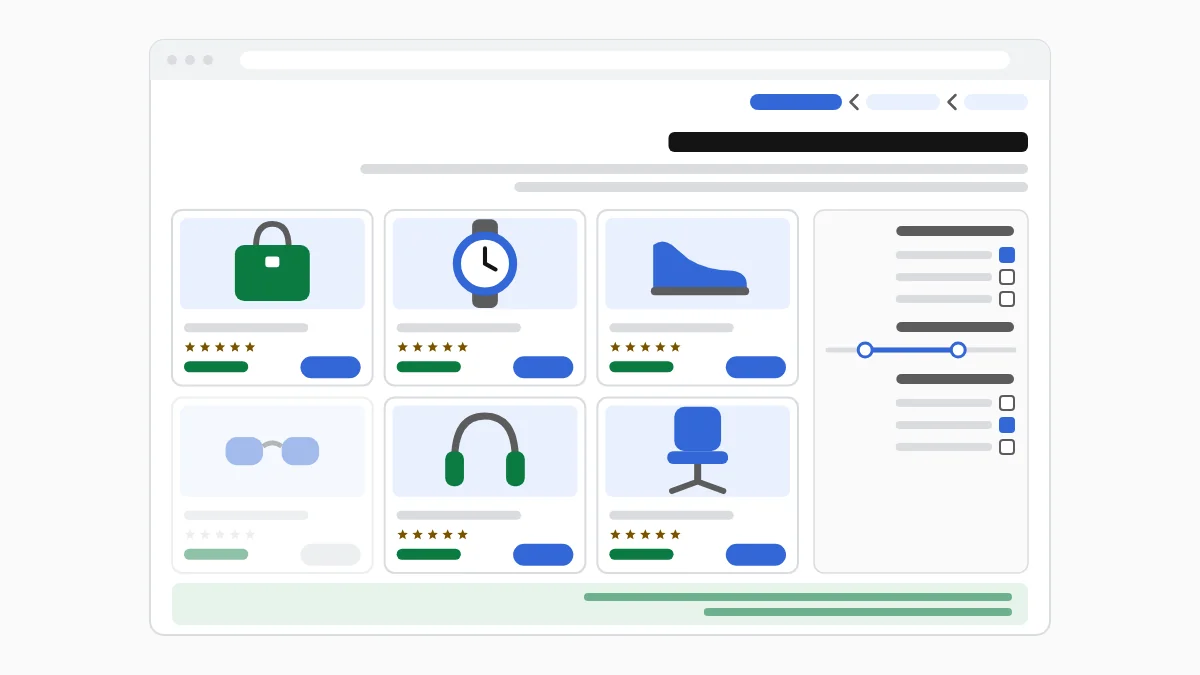
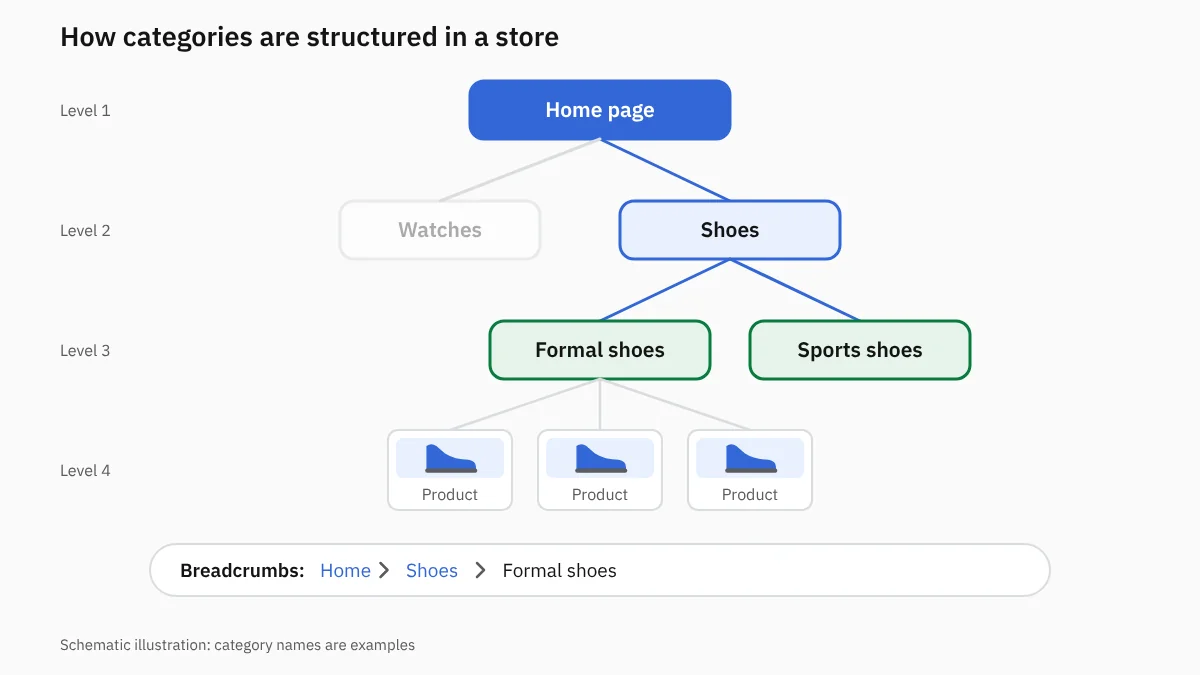
A category page sits between the home page and the product pages, so it shapes how shoppers move through the store and how search engines understand its structure. Organizing it well helps products get discovered and clarifies the relationship between main categories and subcategories.
Category page SEO targets terms that signal an intent to browse and buy, then improves the page’s content, headings, links and filters so it becomes useful to shoppers and easy to understand and index.
Why does a category page make a difference to sales?
Category pages have a strong chance of attracting customers because they show several options in a single visit. Their importance comes down to the following points:
1. Targeting broader search terms than product names
Many shoppers search by product type before they know the model, so a formal shoes category page, for example, can reach a wider audience than the page for a single shoe.
2. Attracting shoppers who want to compare and choose
The page shows several products that differ in price, color, material and specifications, so shoppers can compare without going back to the search results each time.
3. Helping customers reach the right products
Organized categories and useful filters help shoppers reach the product that fits their budget and needs, which reduces the chance they leave because of too many options or hard browsing.
4. Spreading the store’s strength across product pages
A category page links to every product under it and passes part of the internal-link strength to them. It also helps search engines discover new products.
5. Supporting visibility for buying keywords
Category keywords carry strong commercial intent, because the searcher wants to see a range of products and pick one, so the visit can turn into an add-to-cart or an order.
6. More chances of adding products to the cart
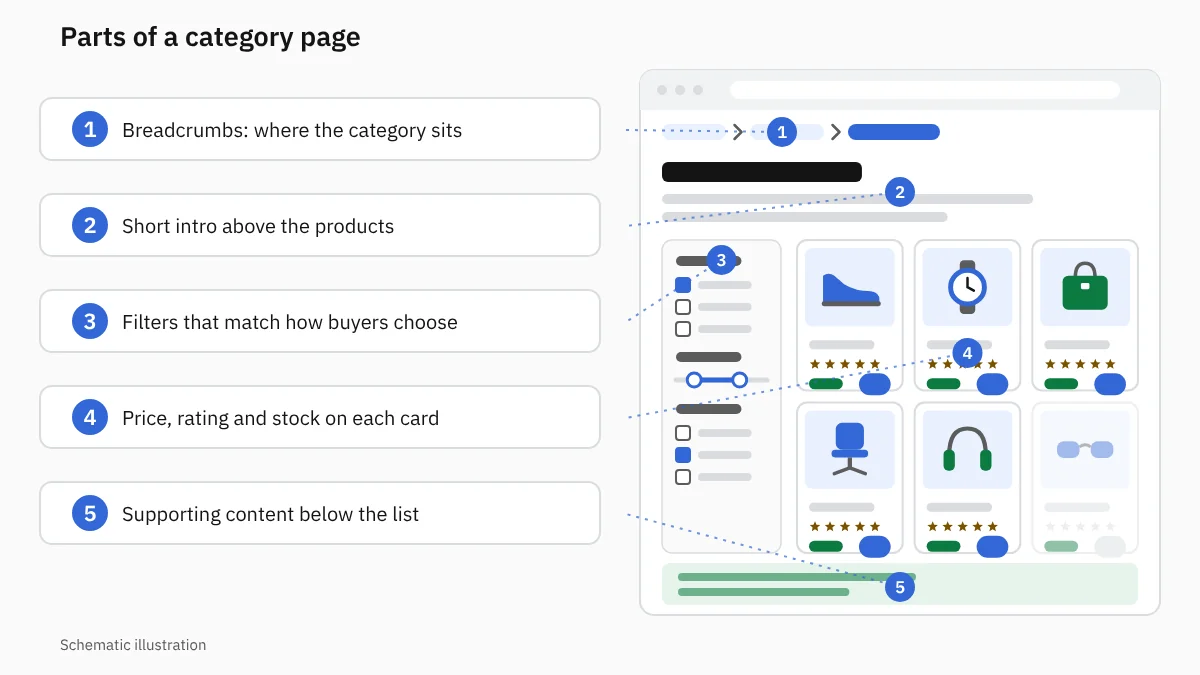
A good category page makes price, rating and key features easy to reach, and gives the shopper more than one alternative if the first product does not fit.
7. Better return from free traffic
Category page SEO brings customers from search results without paying a separate cost for each visit, and the page keeps delivering value as its products are updated and improved.
How do you choose which product categories to optimize first?
Not every category needs the same amount of work, so start with the pages that have the strongest commercial opportunity, including:
1. Categories with the highest sales
The category holding the most-demanded products deserves higher priority, because any increase in its visits can feed directly into revenue.
2. Categories with enough search volume
Keyword research reveals the categories customers actually search for, so the business avoids investing time in a category without enough demand.
3. Pages ranking close to the first page
A page at the bottom of the first page of results or the top of the second needs specific improvements to reach positions that attract more clicks.
4. Categories that get impressions without clicks
High impressions with few clicks point to a weak title or description, or one that does not match what the shopper wants.
5. Categories with enough products
A category needs a range that gives shoppers a real choice; a page with two or three products often looks weak and unhelpful.
6. Seasonal categories before demand peaks
Optimizing occasion, summer and back-to-school categories starts well before the season, so the page is ready when searches rise.
7. Categories where competitors outrank your store
Analyzing the results reveals categories where you have good products but pages that do not compete, which makes improving them a chance to win back part of the demand.
What does a category page SEO service include?
The service combines organizing the store, improving the page and fixing the technical issues that come with a large catalog. It includes the following work:
1. Analyzing commercial search terms for each category
The terms customers use when searching for a product category are collected, then grouped by type, use, material, brand and the features that influence a purchase.
2. Organizing main categories and subcategories
A hierarchy is built that helps shoppers understand the sections, with specific categories nested under the main category without branching that confuses visitors.
3. Improving the category name and page title
The category uses a name customers know and search for, and the page title presents the product type in an appealing way that encourages clicks.
4. Writing a description that helps shoppers choose
The description explains what the category contains and the key differences between products, and offers information that makes comparison easier instead of repeating the keyword without purpose.
5. Ordering products to serve the shopping experience
Best-selling, top-rated or in-stock products can be placed at the top of the category, so shoppers quickly meet options worth their attention.
6. Improving images and links within the category
Image quality, file sizes and product URL names are reviewed, because a category page holds many elements and its speed can easily suffer.
7. Controlling filters and sorting options
Filters stay available to shoppers, but their URLs are controlled so they do not create thousands of near-identical pages in Google’s index.
8. Handling similar and duplicate pages
The team identifies categories that show the same products or target the same keyword, then chooses to merge or differentiate them according to customer needs.
9. Developing internal links between categories and products
Main categories link to subcategories, products and buying guides, so moving around is easier for visitors and search engines understand the store’s structure.
10. Reviewing indexing and key pages
The specialist makes sure the important categories are indexed, and that low-value pages do not compete with them or use up crawl time.
11. Measuring clicks, orders and sales
Visits to each category, movement to products, add-to-carts and revenue are tracked, so evaluation is tied to sales and not only to rankings.
How do you choose keywords for category pages?
Keyword choice decides which audience reaches the category, so category page SEO relies on several criteria:
1. Focusing on terms that signal buying intent
Terms that describe a range of products deserve higher priority than general phrases that attract people looking only for information.
2. Giving each category its own main keyword
Each category needs a distinct target that stops the store’s pages from competing with each other and gives the search engine one clear page for each query.
3. Using the product attributes customers search for
Terms for color, material, size and use help create categories that serve specific needs when there are enough products inside them.
4. Considering brands, materials, sizes and uses
A brand or material can deserve its own page if customers search for it and the store carries a strong range of it.
5. Preventing several categories from competing for the same keyword
When two pages show up for one keyword, their titles, content and products are reviewed, then each page is given a clear role, or the two are merged if they are similar.
How do you write a category description that helps sales and visibility?
A category description should serve the shopper first, because text that does not help them choose takes up space without adding value. It can be organized around the following elements:
1. A short introduction above the products
A short paragraph explains the type of products available and the category’s general benefits, then leaves the product list visible without forcing the shopper to read long text.
2. Explaining the product types available
The content names the main choices in the category, such as materials, models and uses, so visitors know the store offers what they are looking for.
3. Helping shoppers understand the differences
The page explains the difference between options that may look similar, helping shoppers choose the right type before moving to a product.
4. Answering questions that affect the purchase
It can explain sizes, compatibility, care or use, depending on the products and the questions that come up repeatedly before a purchase.
5. Adding supporting content below the product list
The lower part of the page has room for further explanation, a buying guide or FAQs, without delaying the shopper’s access to the products.
6. Avoiding filler and forced keyword repetition
Repeating the category name in every sentence weakens the reading experience, while good writing uses product-related terms naturally.
Where should category page content go?
It is best to place a short introduction above the products so shoppers and search engines understand the page’s topic immediately, then put detailed content below the product list if there is information worth explaining.
A balanced layout stops the category from turning into a long article that hides the products, lets quick shoppers start comparing right away, and gives hesitant shoppers more information when they need it. No fixed amount of space suits every store, so choose the layout based on the products and how visitors behave on mobile.
How do you organize main categories and subcategories in a store?
A well-organized structure reduces confusion and prevents similar categories, and it can be built on the following points:
1. Create a category for each real buying need
A category deserves its own page when customers search for it and it holds enough products that differ from other categories.
2. Avoid overlapping and similar categories
Near-identical categories confuse customers and make it hard for search engines to tell which page matters most for a keyword.
3. Link subcategories to the main category
Subcategories appear on the main category page, so shoppers move from the broad range to a more precise choice.
4. Keep important categories close to the home page
The highest-value categories get links in menus or on the home page, so visitors reach them in a few steps.
5. Use breadcrumbs to show the category path
Breadcrumbs show where the page sits in the store and let shoppers go back to the parent category without the back button.
6. Avoid weak categories for a handful of products
Creating a category for every minor attribute spreads out pages with few products; a filter inside the larger category is often the better choice.
How do product filters affect category page SEO?
Filters make shopping easier, but they can cause indexing problems when their URLs are left unmanaged. Their effect shows in the following:
1. Helping shoppers narrow their options
Shoppers use price, size or color filters to reach a set that suits them instead of browsing dozens of products.
2. Creating many near-identical URLs
In some stores every selection or sort order creates a new URL, producing hundreds of copies that show the same products in a different order.
3. Wasting search engines’ time on unimportant pages
Crawlers get busy with filter URLs instead of visiting the categories and products the store wants to show.
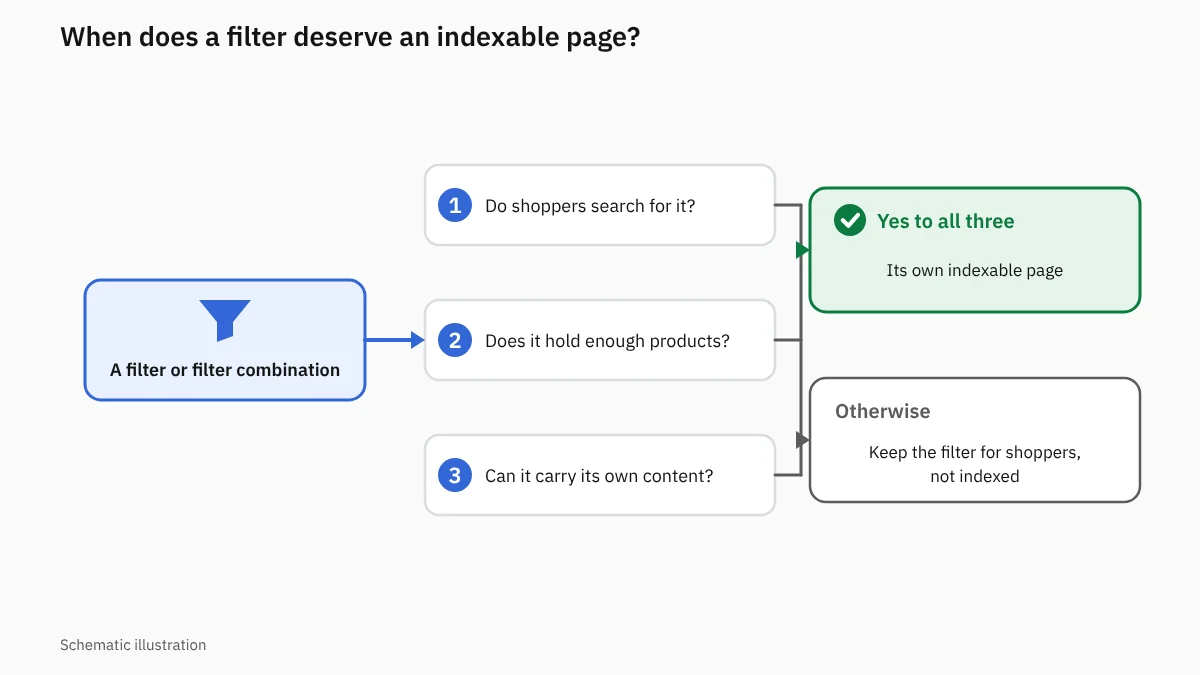
4. Deciding which filters deserve their own page
A filter deserves an indexable page when it represents demand that customers search for, holds enough products and can carry its own content.
5. Preventing low-value combinations from being indexed
Combinations without demand, or that produce near-duplicate pages, are excluded so the store’s strength stays focused on the important pages.
6. Keeping filters easy for shoppers to use
Blocking some URLs from indexing does not mean disabling the filters; they can stay useful to shoppers without turning every selection into a page that competes in Google.
How do you handle out-of-stock products within a category?
How stock is displayed affects shopper satisfaction and the quality of the category page. It can be handled as follows:
1. Keep products that are expected back in stock
A product stays in the category if it will be available soon, especially when it gets visits or has steady demand.
2. Show out-of-stock status clearly
Shoppers see the product’s status before opening its page, so they do not waste time trying to buy an unavailable option.
3. Offer alternative products
Similar alternatives help keep visitors in the store and turn their interest toward a product they can buy.
4. Remove discontinued products properly
The URL of a removed product is redirected to the closest alternative where one exists, instead of being sent automatically to the home page or left broken.
5. Avoid filling the category with products that cannot be bought
A page that shows most of its products as unavailable leaves a poor impression; available items can be listed first.
6. Handle empty category pages
A seasonal category stays if its products will return soon and visitors are shown a date or alternatives, while a category that has ended is removed or redirected to a related category.
How do internal links strengthen category pages?
Important categories need links from different parts of the store, and they can be supported in the following ways:
1. Link important categories from the main menu
The menu gives shoppers quick access to the core categories and shows search engines their importance within the store’s structure.
2. Point articles and buying guides to the right categories
A reader of a product buying guide moves on to the category that shows the options, turning an informational visit into a buying opportunity.
3. Link related categories to each other
Links between complementary or alternative categories help shoppers discover more products and increase average browsing time.
4. Use descriptive link text shoppers understand
The link text says where it leads instead of using generic phrases, so visitors know what they will find before they click.
5. Bring visitors back from the product page to the category
Breadcrumbs and links let shoppers return to the category if the current product does not fit their needs.
Which elements encourage shoppers to buy from a category page?
A successful page combines easy comparison with quick access to information. Its key elements include:
1. Clear, consistent product images
Images of a uniform size help shoppers compare products without distraction and give the store a more professional look.
2. Showing price and discount upfront
Shoppers need to know the price before opening a product, especially when comparing several options within a set budget.
3. Showing ratings and stock information
Ratings give shoppers a quick indication of product quality, while stock information stops them choosing an unavailable option.
4. Filters that match how shoppers choose
The filters that matter depend on the product: a shopper may search by capacity, size, material or type of use.
5. Making product comparison easy
Short specifications and clear names help shoppers see the difference between options without opening many pages.
6. Buy buttons that are easy to use on mobile
View-product and add-to-cart buttons should work well on small screens without accidental taps.
7. Explaining shipping and exchanges where needed
Shoppers worry less when they know shipping is available or exchanges are possible, especially for size-dependent products.
Three technical elements that affect category page SEO
1. Pagination
Many stores spread a category’s products across several pages: page 2, page 3 and beyond. Google recommends giving each of these pages its own URL, linking each page to the next with ordinary crawlable links, and including a link back to the first page of the category.
Google does not recommend making the first page the canonical URL for every page in the sequence; each page should have its own canonical. If the store relies on a “Load more” button or infinite scroll, products must stay discoverable, because Google’s crawler does not click buttons; a sitemap or a Google Merchant Center feed can support this.
2. Breadcrumb structured data
BreadcrumbList structured data helps Google understand where a category page sits in the store’s structure, and may help it show a clearer breadcrumb trail in search results. Product structured data, on the other hand, describes a specific product, so it belongs on product pages.
3. Page experience metrics (Core Web Vitals)
Category pages usually hold many product images, so their performance deserves close attention through the three Core Web Vitals: how fast the largest element on the page loads (LCP), where a good value is within 2.5 seconds; how quickly the page responds to user interaction (INP), where a good value is within 200 milliseconds; and how stable the layout stays while loading (CLS), where a good value is within 0.1.
These metrics can be monitored in the Core Web Vitals report in Google Search Console and improved by compressing images and reserving space for each element before it loads so content does not jump. Google recommends achieving good values for these metrics, but they are one signal among many and do not guarantee any particular ranking.
Mistakes that keep product category pages from appearing in search
A store can have strong products yet lose visits because of mistakes on its category pages, including:
1. Leaving the category page without a custom title
The page misses the chance to explain the product type and appears in results with an automatic title that does not encourage clicks.
2. Copying the same description across several categories
Repeated content makes pages look alike and fails to give information that fits each category’s products.
3. Creating many similar categories
Near-identical pages compete for the same keywords, and the store’s strength is split among them instead of supporting one main page.
4. Indexing every filter URL
Open indexing leads to thousands of weak URLs that show near-identical lists and serve no real demand.
5. Hiding products from search engines
This happens when the list relies on loading that does not provide crawlable links, so many products stay out of reach of discovery.
6. Using category names customers do not search for
Some stores use internal or creative names the audience does not know, which makes it hard for searchers to reach the page.
7. Showing products unrelated to the category
Shoppers lose trust in a category when they find products far from what they want, and the page’s relevance for search engines weakens.
8. Deleting seasonal categories after the season ends
Deleting them every year loses the page’s history and links, while keeping them and preparing them early lets the store benefit in the next season.
9. Ignoring pages that get impressions without clicks
These pages are a near-term growth opportunity and may need a better title, more suitable products or a review of how well they match search intent.
How do you measure the success of category page SEO?
Measurement needs to follow the shopper’s journey from the search result to the purchase. Key indicators include:
1. Growth in the category’s search impressions
Impressions show the page reaching more people searching for the type of products it shows.
2. Progress on target commercial keywords
Progress on keywords with buying intent shows the page has become a better match for what shoppers need.
3. More clicks to the category page
Clicks reflect how appealing the title and description are and where the page sits in the results.
4. More movement from the category to products
Clicks on products show the category’s ability to present suitable options and encourage shoppers to keep browsing.
5. More add-to-carts
Adding to cart is a stronger indicator than a visit, because it shows the page attracted an audience interested in buying.
6. Growth in orders and revenue from search
Measurement ties the store’s sales to free traffic and reveals the financial value of the optimization work.
7. Better sales of products within the category
Comparing product performance before and after optimization shows the effect of list order, filters and content on customers’ decisions.
When do category page SEO results appear?
The time varies with the store’s age, the competition, the state of the pages and the number of categories to be improved. Early changes may appear in indexing and clicks, while strong commercial keywords need several months of work and follow-up.
A category rich in products and well linked within the store improves the chances of growth, while new pages or categories in competitive markets need stronger content and more trust signals.
How much does category page SEO cost?
Cost depends on the number of categories, the size of the store and the state of its filters, links and content. A store with ten categories needs a different scope from a store with hundreds of categories and thousands of products.
Cost rises when the project needs the category structure rebuilt or development work to control filters and pagination, and it is also affected by the number of descriptions required and how strong the competition is for product keywords.
Why do you need a company that specializes in ecommerce SEO?
Stores face different challenges from brochure websites because of changing stock and the large number of URLs and filters. A specialist company helps in the following ways:
1. Understanding how categories and products relate
The company defines each page’s role and the keywords that suit it, so categories and products work together.
2. Handling filters without hurting the shopping experience
Shoppers keep using the filtering options while indexing is controlled to avoid a spread of duplicate URLs.
3. Choosing pages that deserve indexing
Categories with demand, products and commercial value get priority, and weak pages are kept out of competition.
4. Linking visibility to sales
The company tracks clicks, add-to-carts and orders, so the project does not turn into more visits that produce no revenue.
5. Coordinating SEO, content and development
Some problems need writing and some need code changes, so coordination ensures the plan is carried out without conflicts.
6. Keeping categories current as stock changes
A store’s products change constantly, and categories, links and alternatives must be updated so the page stays useful and able to sell.
How can Internet Solutions help you improve your store’s categories?
Internet Solutions helps your store use its category pages as direct entry points to products and sales. We analyze how your customers search, then review your main categories and subcategories, filters, content and links before ranking the improvement opportunities by commercial value.
Our team develops category pages so they combine easy shopping with clarity for search engines, and tracks their performance with analytics tools such as Google Search Console and Google Analytics. The work includes handling similar pages, controlling indexing, improving copy and supporting key categories with suitable internal links.
Request a quote to improve your store’s category pages, and let the Internet Solutions team help you with category page SEO.
Conclusion
A category page is not a silent list of images and prices: it welcomes shoppers at the comparison stage and helps them reach the right product. Optimizing it gives the store a chance to appear for broad commercial keywords and attract visits that can turn into sales.
Category page SEO depends on choosing the right categories, organizing the structure, controlling filters and writing content that supports the buying decision, then measuring results through clicks, carts and revenue. The work needs continuous follow-up because stock, demand and competition change over time.
Frequently asked questions
Sources
Share this article